The early access list is open

Make editing the easiest part of your content creation.

You film on your phone. ClipsCaddy edits the video for you: the cuts, the captions, the sound and the graphics. You watch it, say what to change, and post.

Runs on your Windows PC, with Claude doing the work. Your video files stay on your computer. Join the list and we email you when your spot opens. Early access price $69.95, one payment.

Bridget, to camera
The product, close
Will, to camera
In use

Drop in your phone clips.

Any order, any length.

Pick a style. Press Begin.

Claude does the editing.

See it before it is built.

Every shot on a card. Tap a word to cut it.

Get your finished video.

Say what to change, then Remix it for every app.

Sound familiar?

Filming is the fun part. Then comes the editing.

The clips pile up.

Your phone is full of good footage that never turned into a video.

The hours disappear.

Trim the pauses, type the captions, keep the words off your face, export, and do it again.

The posting slows down.

You have more to say than you have evenings to edit it.

ClipsCaddy takes that part off your plate, so you can keep making videos.

How it works

Three steps, and you are done.

1Drop

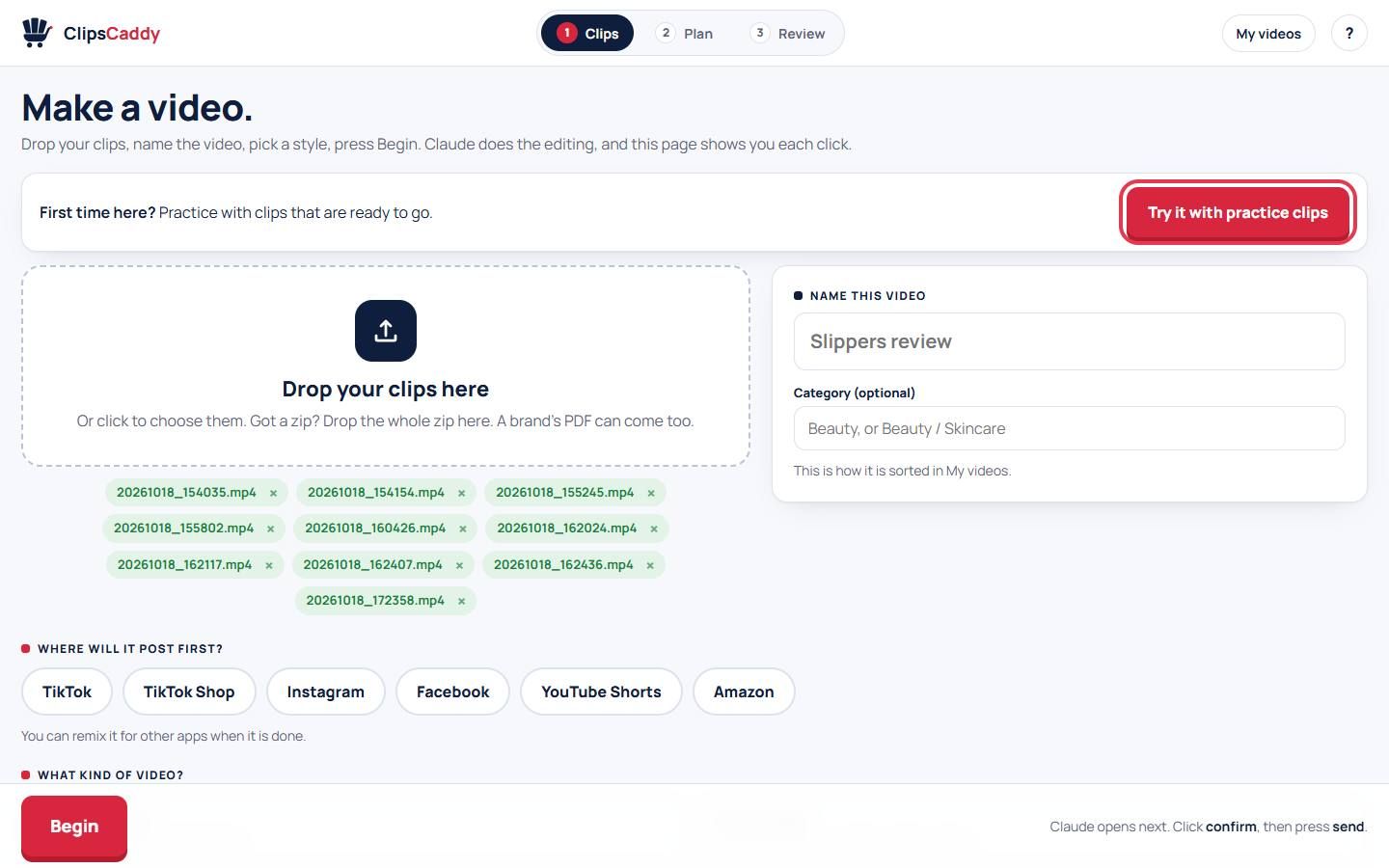
Drop your clips in. Pick a style. Press Begin.

Straight from your phone, any order, any length. Name the video and choose where it will post first. Your first time, it walks you through every step, with practice clips ready to go.

The start page: drop your clips, name the video, choose where it posts

2Plan

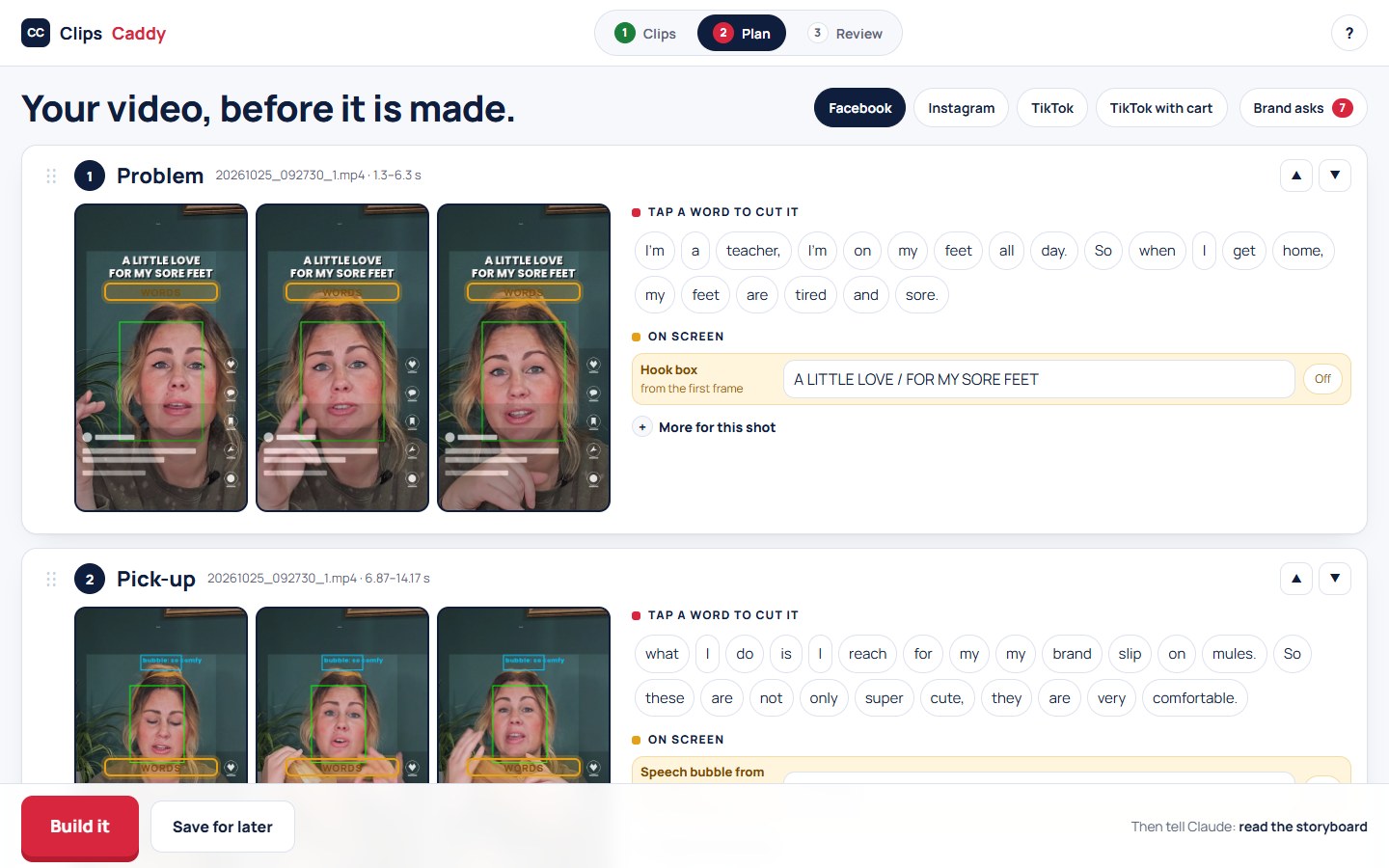
See the video before it is built.

Every shot on a card, in order. Move one. Tap a word and it is gone. When it looks right, press Build it.

The plan page: every shot on a card, every word ready to tap

3Review

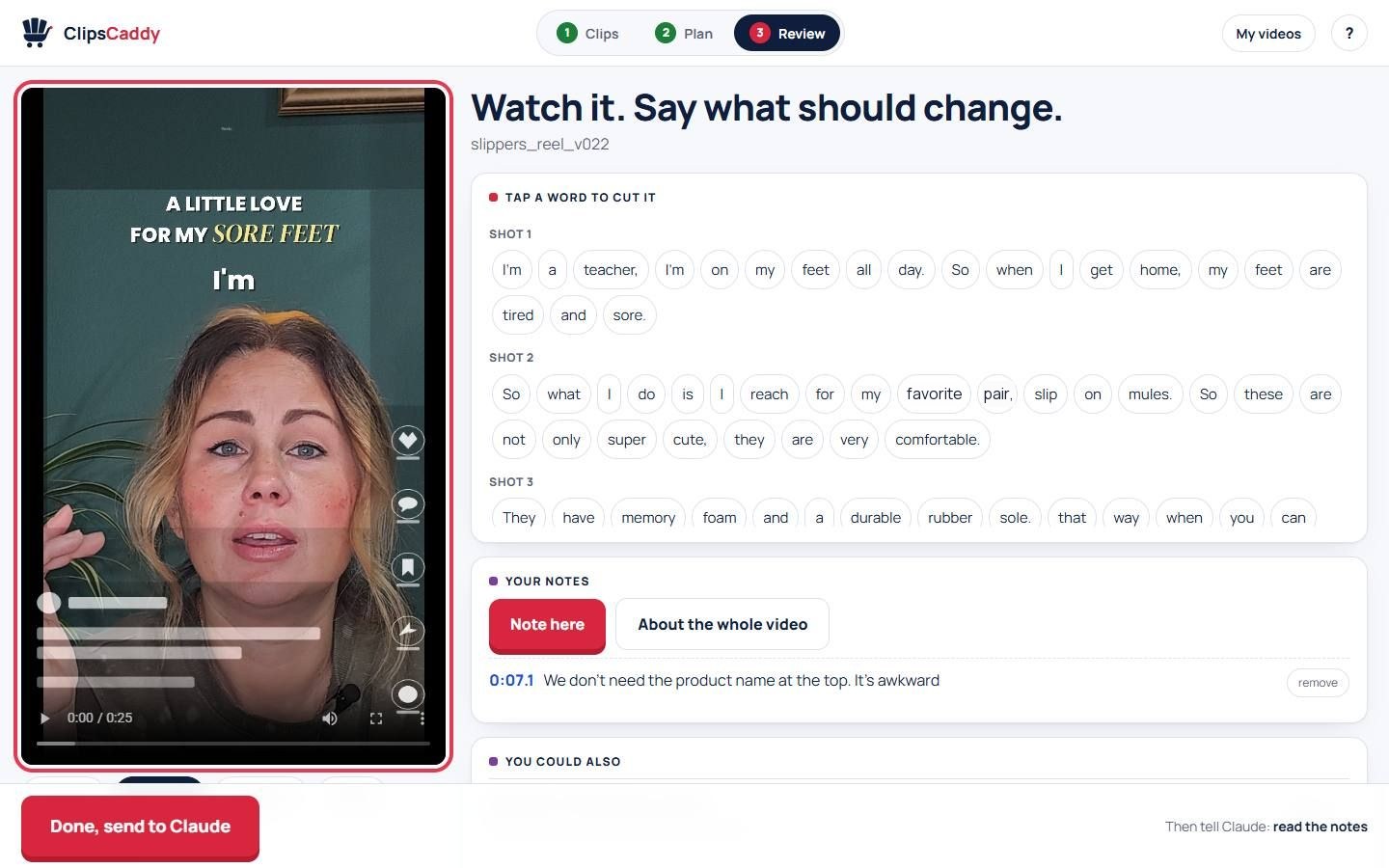
Watch it and say what should change.

The finished video plays beside every word you said. Tap a word to cut it. Leave a note in your own words. It rebuilds, and you post it.

The review page: the finished video playing, every word you said beside it

What you get back

Your first cut comes back finished.

You may not know what to ask for yet, and that is fine. It does the heavy lifting first, then you make your notes.

Cuts that keep it moving

Long pauses and ums come out where the cut is clean. Your words stay whole.

Big opening words and captions

A strong first line on screen, with captions placed to stay clear of your face and the app's buttons.

Clearer sound

Room noise comes down, and you still sound like you.

The thing you are talking about

When you name something, it can pop up on screen while you keep talking.

Graphics, labels and motion

Added for you on the first cut, so you can see them. Love it, or tap Take it out.

Ideas you may not have thought of

Every review comes with a short You could also list. Say the word and it is in.

See it run

Half a minute of the real thing.

Every screen in it is the kit itself, captured as it runs. The clips are real phone clips. The finished video is the one it built.

Your kind of video

Pick a style, or let Claude pick one for you.

Each style comes with its own shot order, and you can describe your own idea in plain words. When one video is done, Remix it for the next app.

  • Talk to camera
  • Review
  • Storytime
  • Reply to a comment
  • Skit
  • Get ready with me
  • Favorites list
  • This or that
  • Product demo
  • How-to
  • Before and after
  • Unboxing
  • Voiceover
  • Day in my life
  • ASMR
  • Silent how-to
  • Quick result loop
  • Text on screen

One shoot, every app

Film once. Post everywhere.

Pick the app you post to first. When that video is done, Remix it for the next one. Same clips, built to each app's rules.

Instagram and Facebook

Fills the frame with you and ends by pointing people to your link.

TikTok

Ends on a question people want to answer in the comments.

TikTok Shop

Ends on your cart, and follows TikTok Shop's rules.

YouTube Shorts

Up to 3 minutes, pointing to your tagged products or your channel.

Amazon product page

A calm review for the listing itself, with the product shown in use.

Walmart Creator

The partnership said out loud and shown on screen, the way the program asks.

You have the last word.

Plain words

Tell it what you want the way you would tell a friend.

Your call, every time

Want the pause back? Want it raw? Say so, and it does it your way.

Your videos, sorted

Everything lands in My Videos by category, title and app. Anything you toss waits in the Trash until you empty it.

Will, who built it
Bridget, the first creator it carried

Why it exists

I built it so my wife could have her evenings back.

Bridget is good on camera. The editing was my job, and it took hours. So I taught the whole routine to Claude and handed it off. ClipsCaddy is that routine.

If you can film, you can do this.

Will

Read the whole story

The early access offer

Everything in the kit, at the early access price.

The kitRuns inside Claude on your computer. Yours to keep.
Included
Every styleTalk to camera, get ready with me, how-to, storytime, unboxing and more, plus your own idea in plain words.
Included
Your first video, guidedIt walks you through every step the first time, with practice clips ready to go.
Included
The shoot-card writerStill to film? Say so. It writes what to say and what to film, shot by shot.
Included
One cut per app, checkedInstagram, Facebook, TikTok, TikTok Shop, YouTube Shorts, Amazon and Walmart Creator, each built to its own rules.
Included
Phone reviewWatch it on the couch. Tap where it should change.
Included
Brand-brief readingDrop the PDF in with the clips. The edit holds to it.
Included
Every update, freeWhen a recipe or a check improves, you get it. Every update is included, for life.
Included
The founders' channelTalk to me directly and vote on what gets built next.
Early access

This is early access, and it stays early access until the kit leaves beta. Everyone in it shapes it. You tell me what would make it better for you, and it gets built into the kit, for everyone. That is what the early access price buys: the kit, and a say in it.

Early access price

$69.95 $79.95one payment, yours to keep. Claude's own plan is separate.
Early access price while the kit is in beta. Then it is $79.95.

Questions people ask first.

Am I techy enough?

If you can copy clips to your computer and press a button, yes. The first time, it walks you through every step with practice clips. Claude installs what it needs after you say yes.

Will it still look like me?

It is your face, your words and your product. If your style is one raw take, say so, and it keeps it raw. You have the last word on every video.

What do I need?

A Windows PC and the Claude desktop app on a paid Claude plan. Claude does the editing on your computer, and ClipsCaddy is what teaches it how.

How long does one video take?

A build takes a few minutes on a recent laptop. Your first video usually takes two or three rounds while you tell it what you like.

What happens to my videos?

Your video files stay on your computer. Claude reads your words and looks at frames from your clips so it can edit, under your own Claude account.

See every question